
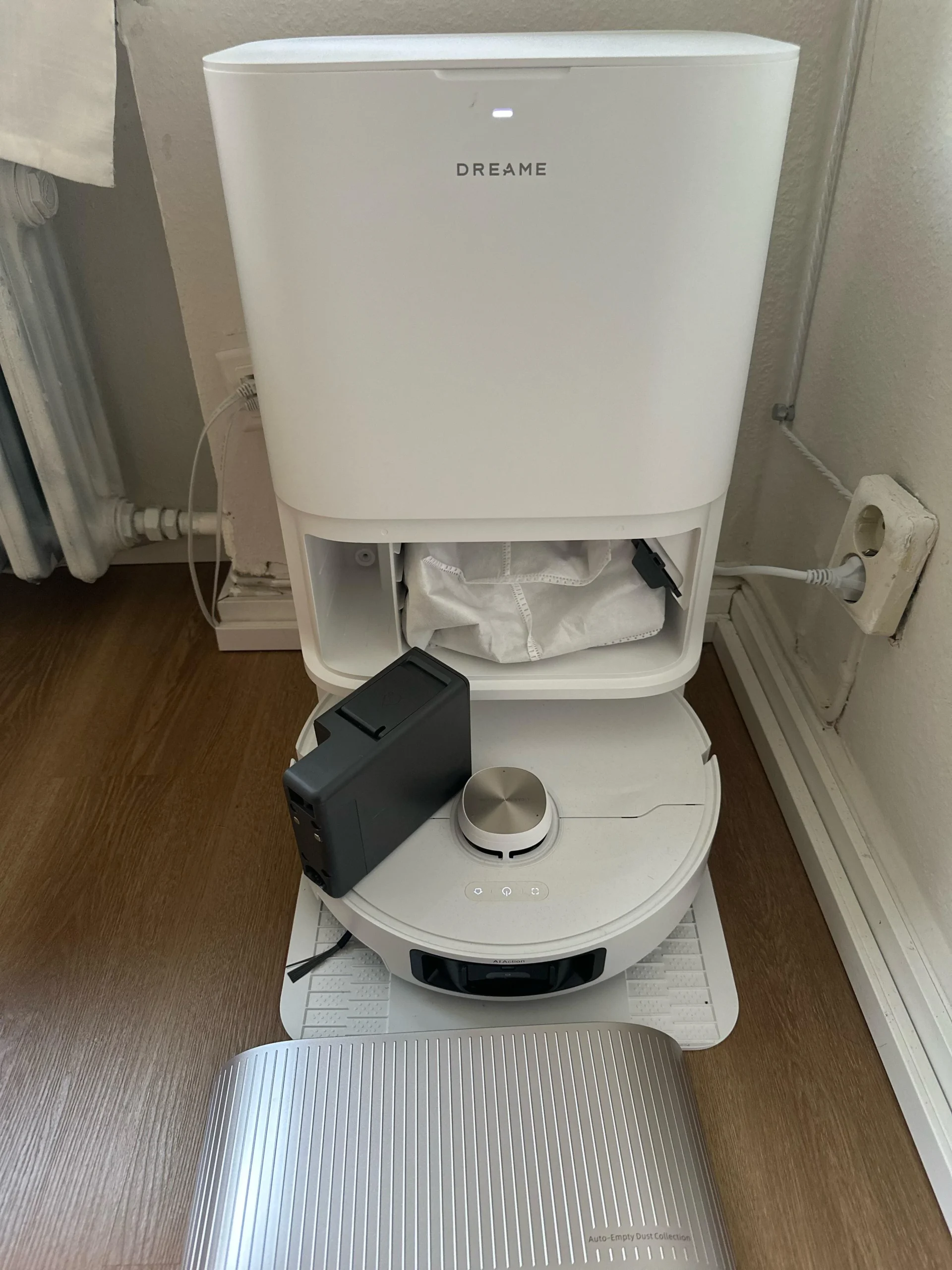
The Dreame L40 Ultra sits in that increasingly crowded space of “premium robot vacuum that promises to do everything.” Vacuuming, mopping, self-cleaning, self-drying, auto-emptying, smart mapping, obstacle avoidance, and a dock that looks like a small appliance on its own.
On paper, it sounds like the kind of device that replaces your entire floor-cleaning routine. In reality, it gets very close in some areas and still shows its limits in others.
This review breaks it down properly, based on how it actually behaves in a home, not just how it looks on a spec sheet.
If you click the button above you will be redirected to Amazon.com. In case you then decide to buy anything, Amazon.com will pay me a commission. This doesn’t affect the honesty of this review in any way though.
Design & Build Quality
The Dreame L40 Ultra makes a strong first impression, but not in the way some sleek, minimalist gadgets do. It doesn’t try to disappear into your home. Instead, it shows up as a serious piece of equipment that clearly prioritizes function over subtlety. Whether that feels reassuring or intrusive depends a lot on your expectations and your space.
Starting with the robot itself, the design follows the familiar circular format most high-end robot vacuums use. It’s about what you’d expect in size, wide enough to cover ground efficiently but still low-profile enough to slide under sofas, beds, and cabinets. That said, it won’t fit everywhere. If you have very low furniture, especially pieces with clearance under 10 cm, this robot simply won’t reach those areas. In practice, that’s not unusual, but it’s still something you notice after a few runs.
The top of the robot features the LiDAR turret, which slightly increases the overall height. The turret itself feels sturdy and well-integrated, not like an afterthought. The buttons on top are minimal, usually just power and home, which keeps things simple. Most interaction happens through the app anyway, so physical controls are intentionally limited.
Material-wise, Dreame uses a mix of matte and slightly glossy plastics. The finish looks clean out of the box, but like most robot vacuums, it does pick up dust and fingerprints over time. The upside is that the materials feel solid. There’s no creaking when you press on the shell, and nothing feels loose or poorly fitted. You get the sense that it’s built to handle daily bumps into furniture without falling apart or looking worn too quickly.
Around the sides, the bumper is responsive and well-damped. When the robot does make contact with furniture, it’s gentle. Over time, you might see light scuff marks on the bumper, but that’s normal for any robot vacuum. The important part is that it doesn’t hit things aggressively, which protects both the robot and your furniture.
Underneath, the design becomes more functional. The brush system is clearly built with performance in mind. The main roller brush sits centrally, supported by a side brush that pulls debris inward. The components are easy to remove, which matters more than you’d think. Hair and dust buildup are inevitable, so being able to access and clean these parts without tools makes a real difference in long-term usability.
The mop pads are mounted at the back and are designed to spin rather than drag. They attach securely but can still be removed without much effort. The mechanism that lifts them when carpet is detected feels solid and responsive. It’s one of those small design details that you don’t notice when it works, but you definitely would if it didn’t.
Now, the dock is where things shift from “robot vacuum” to “cleaning system.” It’s large. There’s no way around that. If you’re used to basic charging docks, this will feel like a big jump. You need to dedicate a proper space for it, ideally against a wall with enough clearance on both sides.
The size comes from everything it contains. Inside the dock, you have separate tanks for clean and dirty water, a dust bag system, a mop washing area, and a drying mechanism. Each of these parts is physically substantial, and together they create a unit that’s closer to a small appliance than an accessory.
The water tanks, in particular, are well designed. They’re large enough to support multiple cleaning cycles without constant refilling, and they slide in and out smoothly. The handles feel sturdy, and the plastic is thick enough that you don’t worry about cracking or leaks. The lids seal securely, which is important for preventing odors or spills.
The dust collection system uses replaceable bags. While some people prefer bagless systems, the bag approach here keeps things cleaner during disposal. You remove the bag, seal it, and throw it away. It’s simple and hygienic, especially if you’re dealing with fine dust or pet hair.
One area where the design could be better is the dock’s base. This is where the robot parks and where the mop pads are washed. Over time, this area can accumulate dirt and residue. The problem is that it’s not particularly easy to clean thoroughly. You can wipe it down, but getting into all the corners and crevices takes effort. A more modular or removable design would have helped here.
Visually, the dock is fairly neutral. It usually comes in a clean white or light color, with a simple, functional look. It doesn’t try to stand out, but it’s too large to ignore completely. In a kitchen or utility area, it fits in naturally. In a living room, it’s more noticeable.
Cable management is handled reasonably well. The power cord exits cleanly from the back, and once it’s set up, you don’t have to interact with it much. Still, because the dock is large, placement matters. You’ll likely spend some time figuring out the best spot where it’s accessible but not in the way.
Another small but important detail is how the robot docks itself. The alignment is precise, and the connection points feel robust. When the robot returns to the dock, it doesn’t struggle or fumble. It lines up, connects, and starts whatever process is needed, whether that’s charging, emptying, or washing the mop pads. That consistency adds to the overall sense of quality.
Durability, at least in early and mid-term use, seems strong. The moving parts, including the mop lifting mechanism and brush assemblies, feel engineered for repeated use. There’s always a question of how these systems hold up after a year or two, especially with daily operation, but nothing about the design feels fragile or experimental.
From a practical standpoint, the design choices reflect how the product is meant to be used. This isn’t a device you take out occasionally. It’s meant to live in your home, run regularly, and handle most of the cleaning work automatically. That’s why the dock is so large and why the robot is built to be self-sufficient.
At the same time, that approach comes with trade-offs. You gain convenience and automation, but you give up some flexibility and simplicity. You need space for the dock. You need to maintain it occasionally. And you have to accept that it’s a visible part of your home environment.
In everyday use, the build quality holds up well. The robot moves with confidence, the dock operates reliably, and the overall system feels cohesive. It doesn’t feel like a collection of separate features stitched together. Instead, it behaves like a single, integrated product designed with a clear purpose.
If you value solid construction, practical design, and long-term usability, the L40 Ultra delivers. It’s not the most elegant or discreet option, but it’s one of the more thoughtfully built systems in its category.
Navigation Intelligence & Mapping
Navigation is one of those areas where robot vacuums either feel smart and dependable or frustrating and unpredictable. The Dreame L40 Ultra sits somewhere in the upper tier of performance, but it’s not flawless. It does a lot right, especially in structured environments, but its limitations become clearer in more complex, real-world situations.
At the core of its navigation system is LiDAR. The sensor sits on top of the robot and continuously scans the surroundings, building a map in real time. This approach has a few clear advantages. First, it’s fast. On the initial run, the L40 Ultra can map an average home in a surprisingly short time, often completing a full layout without needing to clean at the same time. That’s useful because you can get everything set up quickly and start customizing the map right away.
Second, LiDAR works in complete darkness. That might sound like a small detail, but it makes a real difference in daily use. You can run the robot at night or in low-light conditions without any drop in performance. There’s no reliance on ambient light or camera-based recognition, so the system remains consistent regardless of time of day.
The initial mapping process is generally accurate. Walls, large furniture, and room boundaries are captured cleanly. The map that appears in the app looks logical and easy to understand. In most cases, you won’t need to redraw or correct major structural elements. That’s a strong start, and it gives you confidence in the system.
Once the map is created, you can divide it into rooms. This is where the software side comes in. The L40 Ultra allows you to label rooms, merge or split areas, and assign specific cleaning settings to each space. For example, you might set higher suction in the living room, lower suction in the bedroom, and different water levels for the kitchen. This level of control adds flexibility, especially if your home has mixed flooring types.
In day-to-day navigation, the robot follows structured cleaning paths. It doesn’t wander randomly. Instead, it moves in straight lines, covering one section at a time before shifting to the next. This method is efficient and predictable. You can actually see the logic in how it cleans, which is reassuring.
When it comes to moving between rooms, the robot handles transitions well. It can cross thresholds and small height differences without getting stuck. It also understands room boundaries as defined in the map, so when you tell it to clean a specific room, it generally stays within that area.
Obstacle avoidance is where things get more complicated. The L40 Ultra relies on structured light and distance sensors rather than a camera. That means it detects objects based on shape and proximity, not recognition. It knows something is there, but it doesn’t know what it is.
For larger objects, this works fine. Furniture legs, walls, and bigger items are detected early, and the robot navigates around them smoothly. It slows down as it approaches obstacles, adjusts its path, and continues cleaning without much interruption.
However, smaller or more irregular objects can cause issues. Things like charging cables, thin cords, socks, or small toys are harder for the system to handle. Sometimes the robot avoids them. Other times, it nudges them or even gets tangled. This inconsistency is one of the main limitations of non-camera systems.
In a tidy home, this isn’t a big problem. If floors are relatively clear, the robot performs very well. But in a more lived-in environment, where small items are occasionally left on the floor, you need to be more careful. A quick check before running the robot becomes part of the routine.
Another area where the navigation shows its limits is in tight or cluttered spaces. The robot is good at open areas, but when it comes to navigating around chair legs, under tables, or through narrow gaps, it can be less efficient. It may take multiple passes or approach the same area from different angles before completing the section.
That said, it rarely gets completely stuck. The system is good at recognizing when it’s having trouble and adjusting its path. In most cases, it will eventually find a way through or move on and return later.
Edge cleaning is decent but not perfect. The robot gets close to walls and baseboards, but it doesn’t always capture every bit of debris along the edges. This is partly due to the round shape, which naturally leaves small gaps in corners. Some models try to compensate with extended side brushes, and while the L40 Ultra does a reasonable job, it’s not flawless.
One feature that works particularly well is the ability to set no-go zones and virtual walls. Through the app, you can draw boundaries directly on the map. This is useful for keeping the robot away from delicate areas, cables, or places where it might struggle. The boundaries are respected consistently, which adds a layer of control that helps offset some of the limitations in obstacle detection.
Multi-floor support is another strength. If you have a house with multiple levels, the robot can store separate maps for each floor. When you move it to a different level, it usually recognizes the environment and switches to the correct map. This process is not always instant, but it works reliably once set up.
The navigation system also integrates with cleaning modes. For example, you can choose between standard cleaning, intensive cleaning, or specific patterns. The robot adjusts its movement accordingly, sometimes doing multiple passes in high-traffic areas or focusing more on certain zones.
One subtle but important detail is how the robot handles incomplete cleaning sessions. If the battery runs low, it returns to the dock, charges, and then resumes from where it left off. The mapping system keeps track of what has already been cleaned, so it doesn’t start over unnecessarily. This makes a big difference in larger homes.
Despite all these strengths, the system isn’t truly “intelligent” in the way some marketing suggests. It doesn’t understand context. It doesn’t recognize objects in a meaningful way. It follows rules and sensor data, and it does that well, but it doesn’t adapt in a human-like sense.
This becomes most noticeable in edge cases. For example, if you move furniture slightly, the robot may take a few runs to adjust its internal map. If you introduce new obstacles, it reacts to them physically rather than logically. There’s no learning in the deeper sense, just repeated scanning and adjustment.
In practical terms, though, the navigation is reliable enough that you don’t have to think about it much. You set up the map, define your preferences, and let it run. Most of the time, it does exactly what you expect. The issues that do come up are occasional rather than constant.
The balance here is between privacy, reliability, and intelligence. By avoiding cameras, the L40 Ultra keeps things simple and consistent, especially in low light. But it gives up some of the advanced object recognition that camera-based systems offer. Depending on your priorities, that trade-off may or may not matter.
Overall, the navigation and mapping system is one of the stronger aspects of the L40 Ultra. It’s fast, accurate, and dependable in most situations. It handles structured environments very well and provides enough control through the app to fine-tune behavior.
It’s not perfect, especially when dealing with small obstacles or clutter, but it delivers a level of performance that feels mature and usable in everyday life.
Performance
Performance is where the Dreame L40 Ultra either proves its value or falls short, depending on what you expect from a robot vacuum. On paper, it promises very high suction power and advanced cleaning systems. In real-world use, it mostly delivers, but the details matter.
Starting with raw suction, the L40 Ultra is undeniably powerful for a robot vacuum. When you switch it to higher power modes, you can hear and feel the difference. It doesn’t just glide over the floor; it actively pulls debris in. On hard floors like tile, laminate, or hardwood, this translates into very thorough cleaning. Fine dust, crumbs, sand, and everyday debris are picked up in a single pass most of the time.
One of the more noticeable strengths is how well it handles mixed debris. Some robot vacuums struggle when there’s a combination of fine dust and larger particles. They might push larger debris around or fail to capture finer particles completely. The L40 Ultra manages both quite well. The airflow and brush system seem balanced enough that it doesn’t just scatter things before picking them up.
On carpets, performance is still strong, though this is where the limits of robot vacuums in general start to show. On low-pile carpets, it does a very good job. Dust, hair, and small debris are removed effectively, especially if you enable carpet boost or multiple cleaning passes. You can see visible improvement after a run, which is what you want.
On medium-pile carpets, it still performs well, but you start to notice that it relies more on repeated passes. It can clean the surface layer effectively, but deeper embedded dirt isn’t always fully removed in one go. This isn’t a flaw specific to this model. It’s more a limitation of the category. Upright vacuums with stronger agitation still have the advantage here.
Where the L40 Ultra stands out is consistency. It doesn’t clean one area perfectly and miss another. Instead, it delivers a steady, reliable level of cleaning across the entire space. That matters more in daily use than peak performance in one spot.
Hair pickup is another strong point. If you have long hair or pets, this becomes immediately noticeable. The brush design helps reduce tangling, which is a common frustration with robot vacuums. Hair still wraps around the brush over time, but it’s less severe and easier to remove compared to many older designs. You won’t need to clean the brush after every run, which makes the system feel more low-maintenance.
Edge and corner cleaning is decent but not exceptional. The side brush helps pull debris away from walls and into the main suction path, but there are still small gaps, especially in tight corners. This is largely due to the round shape of the robot. It can’t physically reach into sharp corners the way a manual vacuum or even some D-shaped robots can. In practice, this means you might occasionally need to do a quick manual cleanup in those areas.
One area where performance feels particularly refined is in how the robot adapts to different surfaces. When it moves from hard floor to carpet, it automatically increases suction. This transition is smooth and doesn’t interrupt the cleaning process. You don’t have to manually adjust settings or create complex rules unless you want to fine-tune behavior.
The ability to customize cleaning settings per room also plays a big role in overall performance. You can set higher suction for high-traffic areas and lower suction for quieter spaces like bedrooms. You can also choose to run multiple passes in certain rooms. This level of control allows you to get more out of the hardware, especially if your home has varied cleaning needs.
Another important aspect is how the robot handles debris capacity during cleaning. The onboard dustbin is relatively small, as expected, but this is offset by the auto-empty function in the dock. During a cleaning cycle, the robot can return to the dock, empty itself, and then continue. This means it doesn’t lose performance as the bin fills up. It maintains consistent suction and pickup throughout longer sessions.
In terms of real-world cleaning scenarios, the L40 Ultra handles everyday messes very well. Things like crumbs after meals, dust buildup, tracked-in dirt, and pet hair are all within its comfort zone. If you run it regularly, your floors stay consistently clean with minimal effort.
However, it’s not designed for heavy-duty, one-time cleaning jobs. If you have a floor that hasn’t been cleaned in a long time, or if there’s a large amount of debris, it may take multiple runs to fully clean the area. In those situations, a traditional vacuum is still faster and more effective.
Another subtle but important factor is how the robot deals with airflow and debris movement. Some vacuums create enough airflow to push lightweight debris away before picking it up. The L40 Ultra does a relatively good job of minimizing this effect. It approaches debris at controlled speeds and angles, which helps keep things from being scattered.
Noise also ties into performance in a practical way. In standard mode, the vacuum is strong enough for daily cleaning while remaining quiet enough to run in the background. This encourages more frequent use, which in turn improves overall cleanliness. If a vacuum is too loud, people tend to use it less often, regardless of how powerful it is.
Another point worth mentioning is reliability over time within a single cleaning session. The L40 Ultra doesn’t show a noticeable drop in performance as it moves through the home. It doesn’t get “tired” or less effective. The combination of consistent suction, structured navigation, and auto-emptying helps maintain a steady level of cleaning from start to finish.
There are still a few limitations. For example, very fine debris in deep carpet fibers can remain after a single pass. Heavier particles in thick rugs may require repeated cleaning. And like most robot vacuums, it can occasionally miss small spots due to navigation patterns or obstacles.
But these are relatively minor compared to the overall performance level.
In everyday use, the biggest advantage of the L40 Ultra isn’t just how well it cleans in one session. It’s how well it maintains cleanliness over time. Because it’s automated and easy to schedule, it can clean daily or even multiple times a day. This keeps dirt from building up in the first place, which changes the whole dynamic of floor care.
Instead of doing occasional deep cleans, you end up with consistently clean floors with very little effort. That’s where the performance really shines. It’s not just about power. It’s about reliability, consistency, and how the system fits into daily life.
If you judge it purely as a vacuum, it’s very good for its category. If you judge it as part of a long-term cleaning system, it’s even better.
Mopping Capability
Mopping is where the Dreame L40 Ultra tries to move beyond what people typically expect from a robot vacuum. For a long time, robot “mopping” meant dragging a damp cloth across the floor and calling it a day. It helped a little with dust, but it didn’t really clean. The L40 Ultra takes a different approach, and in daily use, that difference is noticeable.
At the center of its mopping system are two rotating mop pads mounted at the rear of the robot. Instead of passively wiping the floor, these pads spin and apply light downward pressure. That combination of motion and pressure creates a scrubbing effect, which is much closer to how a person would mop manually. It’s not as strong as hand scrubbing, but it’s far more effective than static pads.
On typical hard floors like tile, laminate, or sealed wood, the results are immediately visible. After a run, floors look cleaner, feel smoother underfoot, and have a more uniform finish. Light dirt, footprints, and everyday smudges are removed without much effort. If you run the robot regularly, it keeps floors in a consistently clean state, which reduces the need for deeper manual cleaning.
One of the key strengths of this system is how it handles routine messes. Think of things like dried water spots, light kitchen residue, or dust that has settled and stuck slightly to the floor. These are the kinds of things that vacuuming alone won’t address. The spinning pads lift and remove this layer effectively, especially when combined with the robot’s ability to run frequently.
Water management plays a big role in how well the mopping works. The L40 Ultra uses controlled water dispensing rather than simply soaking the pads. Through the app, you can adjust water levels depending on the type of flooring and how dirty the area is. Lower settings are useful for delicate surfaces like wood, while higher settings help with tougher dirt on tile.
The system does a good job of keeping the pads consistently damp without over-wetting the floor. You don’t end up with puddles or streaks, which is a common issue with less advanced mopping systems. Floors typically dry within a reasonable time after cleaning, depending on the water setting and room ventilation.
Another important feature is the automatic mop lifting mechanism. When the robot detects carpet, it raises the mop pads to avoid getting them wet. This transition happens smoothly and without requiring manual input. In mixed-floor homes, this is essential. Without it, you’d either have to remove the mop pads manually or avoid mopping altogether in areas with carpets.
The integration between vacuuming and mopping is also well handled. The robot can vacuum first and then mop, or do both in a coordinated way. This sequence matters because mopping over loose debris doesn’t work well. By removing dust and dirt first, the robot ensures that the mopping stage is actually cleaning the surface rather than spreading grime around.
Where the system becomes more advanced is in its self-maintenance. After or even during cleaning, the robot returns to the dock, where the mop pads are washed automatically. The dock uses water to rinse the pads and remove accumulated dirt. This keeps the pads clean throughout the cleaning process, which improves overall effectiveness.
The drying function is another practical addition. After washing, the pads are dried using warm air. This reduces moisture buildup and helps prevent odors or bacterial growth. In everyday use, this means you don’t have to worry about damp, dirty mop pads sitting idle between cleaning cycles.
The size of the water tanks in the dock also supports longer cleaning sessions. With large clean and dirty water reservoirs, the system can handle multiple runs before needing attention. This is especially useful in larger homes, where frequent refilling would otherwise become a chore.
Despite all these strengths, there are still clear limitations. The biggest one is how the system handles tougher, dried-on stains. Things like sticky spills, dried food residue, or grease spots are more challenging. The rotating pads can loosen and reduce these stains, but they don’t always remove them completely in one pass.
In those cases, you may need to run the robot multiple times or intervene manually. This is where traditional mopping still has an advantage. A person can apply more pressure, focus on a specific spot, and use stronger cleaning solutions if needed. The robot, by design, spreads its effort evenly rather than concentrating on one area.
Another limitation is edge and corner cleaning. The mop pads are positioned toward the back of the robot, and while they cover most of the floor, they don’t reach perfectly into corners or along all edges. Some residue can remain in those areas, especially if dirt tends to accumulate there. Over time, you may notice slight buildup near baseboards or in tight corners.
The system also depends on relatively clean conditions to perform at its best. If the floor has a lot of loose dirt or debris, and vacuuming isn’t sufficient beforehand, the mop pads can become dirty more quickly. While the dock does wash them, there’s still a limit to how much dirt they can handle effectively in one session.
Another factor to consider is cleaning solution use. Some users prefer to add a mild detergent to improve cleaning performance. The system supports this, but you need to use compatible solutions to avoid damaging internal components. Plain water works well for regular maintenance cleaning, but for certain types of dirt, a cleaning agent can make a noticeable difference.
Noise during mopping is generally low. The spinning pads produce a soft mechanical sound, but it’s much quieter than vacuuming. The louder moments come when the robot returns to the dock for washing or drying. These processes are brief but noticeable.
In terms of day-to-day experience, the biggest advantage of the L40 Ultra’s mopping system is consistency. It encourages frequent cleaning, which prevents dirt from building up in the first place. Instead of waiting until floors look visibly dirty, you can maintain a clean baseline with minimal effort.
This changes how you think about mopping. It becomes less of a separate chore and more of an ongoing process handled in the background. You still need to step in occasionally for deeper cleaning or stubborn stains, but the overall workload is much lower.
It’s also worth noting how the mopping system contributes to the overall feel of the home. Clean floors don’t just look better; they feel different. Walking barefoot, you notice the absence of dust and residue. Over time, this becomes one of the most appreciated aspects of using the robot regularly.
If you compare it to traditional mopping, the L40 Ultra doesn’t fully replace it. It can’t match the intensity or precision of manual cleaning when dealing with heavy dirt. But it reduces how often you need to do that kind of cleaning. For many people, that’s the real value.
In the end, the mopping capability of the L40 Ultra is one of its standout features. It goes beyond basic functionality and delivers a level of cleaning that feels genuinely useful in daily life. It’s not perfect, but it’s a meaningful step closer to fully automated floor care.
Maintenance & Cleaning
One of the biggest selling points of the Dreame L40 Ultra is how much of the maintenance process it automates. The idea is simple: instead of constantly emptying bins, rinsing mop pads, and dealing with dirty water, the system handles most of that on its own. In practice, it delivers on that promise to a large extent, but it doesn’t eliminate maintenance entirely. It just changes what kind of maintenance you do and how often you need to do it.
Starting with the dust management system, the robot itself has a relatively small onboard dustbin, which is typical. What makes the difference is the dock. After or during cleaning, the robot returns to the dock and automatically empties its contents into a sealed dust bag. This process is quick and effective. You hear a short burst of suction, and the bin is cleared.
In day-to-day use, this means you don’t have to think about emptying the robot after every run. Depending on how often you clean and how much debris your home generates, the dust bag can last several weeks before needing replacement. For most people, this alone removes one of the more annoying aspects of robot vacuums.
The bag system itself is designed for convenience and hygiene. When it’s full, you remove it, seal it, and throw it away. There’s no cloud of dust, no shaking out a container, and no direct contact with dirt. This is especially helpful if you have allergies or deal with fine dust and pet hair.
That said, it does introduce a recurring cost. You’ll need to buy replacement bags over time. It’s not a major expense, but it’s something to keep in mind if you’re comparing it to bagless systems.
Moving on to the mopping system, this is where the maintenance experience becomes more complex but also more automated. After the robot finishes mopping, it returns to the dock, where the mop pads are washed using clean water. The system rinses out dirt and debris, then collects the dirty water into a separate tank.
This process works well in practice. The pads come out visibly cleaner, and you don’t have to remove them manually after each run. For daily cleaning, this makes a big difference. It keeps the mopping performance consistent without adding extra steps to your routine.
After washing, the dock also dries the mop pads using warm air. This is a small detail that has a big impact over time. Damp pads left sitting can develop odors or even bacteria. The drying function helps prevent that, keeping the system more hygienic and reducing the need for manual intervention.
However, the dock itself becomes the new focal point for maintenance. While it automates many tasks, it also accumulates dirt over time. The area where the mop pads are washed can develop residue, especially if you’re cleaning frequently or dealing with dirtier floors.
Cleaning the dock is not difficult, but it’s not as simple as it could be. You can wipe down accessible surfaces and rinse certain parts, but getting into all the corners takes a bit of effort. It’s not something you need to do every day, but it does become part of your routine every couple of weeks, depending on usage.
The water tanks are another important part of the system. The dock includes separate tanks for clean and dirty water. These are easy to remove, refill, and empty. The clean water tank needs to be filled regularly, especially if you use higher water settings or run the robot frequently. The dirty water tank needs to be emptied to prevent overflow and odor buildup.
In terms of handling, the tanks are well designed. They have sturdy handles, secure lids, and clear markings. You don’t feel like you’re dealing with something fragile or messy. Still, this is one of the main manual tasks you’ll perform regularly. It’s simple, but it’s not something the system can automate.
Filters and brushes also require periodic attention. The robot’s filter needs to be cleaned or replaced over time to maintain suction performance. The main brush and side brush will collect hair and debris, even with anti-tangle designs. While the system reduces how often you need to deal with these components, it doesn’t eliminate the need entirely.
The good news is that these parts are easy to access. You can remove the brush, clear out hair, and reinstall it in a matter of minutes. The design is clearly intended to make this process as straightforward as possible.
Another aspect of maintenance is software-related. The app provides reminders for tasks like replacing the dust bag, cleaning filters, or checking components. These reminders are helpful, especially if you’re not keeping track manually. They add a layer of guidance that makes the system feel more manageable.
Over time, you also start to notice how the system distributes maintenance tasks. Instead of doing small things frequently, you do slightly larger tasks less often. For example, instead of emptying a dustbin after every run, you replace a bag every few weeks. Instead of rinsing mop pads daily, you clean the dock occasionally.
This shift in routine is one of the main benefits. It reduces the mental load of maintenance. You don’t have to think about it constantly. You just deal with it when needed.
There are still some limitations. For example, if something goes wrong, like a clog or a buildup in the system, you may need to do a more thorough cleaning. The complexity of the dock means there are more parts that can potentially require attention. It’s not overly complicated, but it’s more involved than a basic robot vacuum.
Another point to consider is long-term durability. The more automated features a system has, the more components are involved. Pumps, sensors, and moving parts all need to function reliably over time. While the build quality is solid, this is an area where long-term performance depends on consistent maintenance and proper use.
In real-world use, the system strikes a balance. It doesn’t completely eliminate maintenance, but it reduces it enough to make a noticeable difference. You spend less time on repetitive, everyday tasks and more time on occasional upkeep.
For many people, this is exactly what they want. The goal isn’t to have zero maintenance. The goal is to reduce the effort required to keep floors clean. In that sense, the L40 Ultra succeeds.
If you go into it expecting a fully hands-off experience, you might be slightly disappointed. You still need to interact with the system, refill water, empty tanks, and clean parts. But if you’re used to traditional cleaning routines, the reduction in effort feels significant.
Over time, the maintenance becomes part of a simple rhythm. Check the water tanks every few days, replace the dust bag every few weeks, clean the dock occasionally, and handle brushes and filters as needed. None of these tasks are difficult on their own, and together they’re far less demanding than traditional cleaning.
In the end, the L40 Ultra doesn’t remove maintenance from the equation. It reorganizes it in a way that’s more manageable and less intrusive. For most users, that’s a meaningful improvement in everyday life.
Ergonomics & Usability
Ergonomics and usability are where a product either fades into the background of your daily life or constantly reminds you that it’s there. With the Dreame L40 Ultra, the goal is clearly to minimize interaction. It’s designed to run on its own most of the time, with you stepping in only when necessary. For the most part, it achieves that, but the experience depends on how comfortable you are with smart devices and how much control you want.
Starting with the physical interaction, the robot itself is simple. There are only a couple of buttons on top, usually for starting or stopping a cleaning session and sending the robot back to the dock. These buttons are responsive and easy to access, but in reality, you won’t use them much after the initial setup. Almost everything happens through the app.
The dock, despite its size, is also straightforward to use. The water tanks slide in and out smoothly, and the dust bag compartment is easy to open. You don’t need tools for any of the basic maintenance tasks, which makes a big difference. Refilling water, emptying the dirty tank, or replacing a bag can all be done quickly without any complicated steps.
From a purely physical standpoint, the system is well thought out. Handles are sturdy, parts fit securely, and nothing feels awkward to access. Even if you’re not particularly tech-savvy, you can handle the basic maintenance without confusion.
Where usability becomes more complex is in the software.
The app is the main control center for the L40 Ultra, and it offers a lot of functionality. When you first open it, you’re presented with a map of your home, along with options for starting a cleaning session, selecting rooms, adjusting settings, and scheduling tasks. At a glance, it looks clean and modern, but once you start exploring, you realize there’s quite a bit going on.
The initial setup process is fairly smooth. The app guides you through connecting the robot to your Wi-Fi network, creating a map, and setting basic preferences. Most people can get through this without issues, especially if they’ve used similar devices before.
After setup, the learning curve becomes more noticeable. The app includes a wide range of features:
- Room-specific cleaning settings
- Suction and water level adjustments
- Cleaning sequences and priorities
- No-go zones and virtual walls
- Scheduling and automation options
All of this is useful, but it can feel overwhelming at first. Menus are sometimes layered, and certain options are not immediately obvious. You might find yourself tapping around to locate a specific setting, especially in the early days.
Once you get used to it, though, the app becomes much easier to navigate. It’s one of those systems where the complexity is front-loaded. After you’ve set up your rooms, defined your preferences, and created a schedule, you don’t need to adjust things very often.
One of the most practical features is room-based cleaning. Instead of sending the robot to clean the entire home, you can select specific rooms or zones. This is especially useful for quick cleanups. For example, you can send the robot to the kitchen after a meal or to the living room after guests leave. The process is simple once the map is set up, and it adds a lot of flexibility.
Scheduling is another strong point. You can set the robot to clean at specific times on specific days, with different settings for each session. This allows you to tailor the cleaning routine to your lifestyle. For instance, you might schedule quieter cleaning during the evening and more intensive cleaning during the day when you’re not home.
The automation features are helpful, but they’re not always as “smart” as they sound. While the robot can adjust behavior based on certain conditions, it doesn’t fully understand context. In many cases, manually defined schedules and settings produce more predictable results than relying on automated modes.
Voice assistant integration adds another layer of usability. You can start or stop cleaning using voice commands through compatible systems. This is convenient for quick interactions, but it’s not essential. Most users will rely on the app for more detailed control.
Another aspect of usability is how the robot communicates with you. The app provides notifications for things like completed cleaning sessions, maintenance reminders, or issues that need attention. These notifications are generally clear and useful. If something goes wrong, like the robot getting stuck or needing maintenance, you’re informed quickly.
Error handling is reasonably well implemented. When the robot encounters a problem, it usually provides a clear message in the app. This helps you understand what needs to be done without guessing. However, some issues still require a bit of trial and error, especially if they’re related to navigation or environmental factors.
Day-to-day usability improves significantly once everything is set up. The robot becomes more of a background system. You don’t think about it much. It runs on schedule, returns to the dock, and handles most tasks on its own. This is where the design really pays off.
However, there are still moments where you’re reminded of its limitations. For example, if the robot gets stuck on an object or struggles with a particular area, you need to intervene. These situations are not constant, but they do happen, and they break the illusion of full automation.
Another factor is how the system fits into your home layout. The size of the dock means you need to plan its placement carefully. It needs enough space to operate properly, and it should be in a location that the robot can easily access. Once it’s set up, you don’t move it often, so getting this right at the beginning matters.
From an ergonomic perspective, the biggest advantage of the L40 Ultra is how little physical effort it requires. You’re not pushing a vacuum, bending over repeatedly, or carrying heavy equipment. Most interactions are quick and simple. This makes it particularly appealing for people who want to reduce the physical workload of cleaning.
At the same time, the reliance on the app means that usability depends on your comfort with digital interfaces. If you prefer simple, single-button devices, this system may feel overly complex. If you’re used to smartphones and smart home apps, it will feel more natural.
Over time, the system becomes easier to live with. You learn where everything is in the app, you develop a routine for maintenance, and the robot becomes a regular part of your household. The initial complexity fades, and what’s left is a system that handles most of the work with minimal input.
In the end, ergonomics and usability on the L40 Ultra are about balance. It reduces physical effort significantly, but it introduces a layer of digital complexity. For most users, that trade-off is worth it. Once you get past the learning phase, the system feels convenient, flexible, and largely self-sufficient.
Pet-Friendliness
If you have pets, a robot vacuum isn’t just a convenience. It becomes part of your daily routine in a much more meaningful way. Hair, dander, tracked-in dirt, food crumbs, and the occasional unexpected mess all change how a cleaning device is used and judged. The Dreame L40 Ultra handles some of these challenges very well, while others expose its limitations quite clearly.
Starting with pet hair, this is one of the areas where the L40 Ultra performs strongly. Pet owners quickly notice how much hair accumulates on floors, especially in homes with shedding dogs or long-haired cats. Daily cleaning becomes almost necessary, and this is exactly the kind of scenario where a robot vacuum makes sense.
The suction power, combined with the brush design, allows the L40 Ultra to pick up large amounts of hair effectively. On hard floors, hair is collected without being pushed around or left behind in clumps. On carpets, it does a solid job of lifting surface-level hair, especially with higher suction settings or multiple passes.
One of the more practical benefits is how it deals with tangling. Hair wrapping around the brush is one of the most common annoyances with any vacuum. The L40 Ultra reduces this problem but doesn’t eliminate it entirely. Hair still accumulates over time, but it’s less tightly wound and easier to remove. Instead of spending several minutes cutting hair off the brush, you can usually clear it quickly by hand.
For pet owners, this small difference adds up. Maintenance becomes less frequent and less frustrating, which encourages more consistent use of the robot.
Another advantage is the system’s ability to run frequently. Because the robot can clean daily without much effort from you, it prevents hair from building up in the first place. This is more effective than occasional deep cleaning. Floors stay consistently clean, and you don’t get that visible layer of fur that can appear after just a day or two in homes with heavy shedding.
Beyond hair, there’s also the issue of dander and fine particles. These are harder to see but just as important, especially for people with allergies. The L40 Ultra does a good job of capturing fine dust and dander, thanks to its suction power and filtration system. While it’s not a replacement for dedicated air purifiers, it contributes to a cleaner environment overall.
Noise is another factor that matters more with pets than people often expect. Some animals are sensitive to loud or sudden sounds, and a noisy vacuum can cause stress or avoidance behavior. The L40 Ultra, in its standard and quiet modes, is relatively unobtrusive. Most pets get used to it after a few runs. It doesn’t produce the kind of sharp, high-pitched noise that tends to scare animals.
Of course, reactions vary. Some pets will ignore it completely, while others may follow it around out of curiosity or keep their distance. The consistent movement and predictable paths actually help in this regard. The robot doesn’t behave erratically, so animals can learn its patterns over time.
Navigation also plays a role in pet-friendliness. The robot moves carefully around furniture and avoids large obstacles well. This reduces the chance of it bumping into pets or startling them. The bumper is soft enough that even if contact happens, it’s gentle.
However, this is also where one of the biggest limitations appears: the lack of true object recognition.
Without a camera-based system, the L40 Ultra cannot reliably identify pet-related hazards like small toys, chewed items, or accidents. It detects objects based on shape and distance, not meaning. This works for larger obstacles but struggles with smaller or less defined ones.
For example, a pet toy left on the floor might be avoided, nudged, or dragged depending on its size and shape. A thin rope toy or string can potentially get caught in the brush. These are manageable issues, but they require a bit of awareness from the user.
The more serious concern is pet accidents. If a pet has an accident on the floor, the robot may not recognize it as something to avoid. In the worst case, it can run over it and spread the mess. This is not unique to this model, but it’s an important limitation to understand.
In households with pets that are fully trained and predictable, this may never be an issue. But in homes with younger animals, older pets, or occasional accidents, it’s something you need to consider. A quick check of the floors before running the robot becomes part of the routine.
The mopping system adds another layer to pet-friendliness. On one hand, it’s very useful for dealing with paw prints, drool marks, and everyday messes that pets leave behind. After a rainy walk, for example, the robot can clean up light dirt and water marks effectively. Over time, this keeps floors looking cleaner without constant manual mopping.
On the other hand, the same limitation applies here. The robot can handle light, routine messes, but not heavy or unusual ones. If there’s something sticky, thick, or outside the normal range of dirt, it may smear rather than clean it completely. Again, this isn’t a failure so much as a boundary of what automated cleaning can handle.
Another point worth mentioning is the dock. For pets, especially curious ones, the dock can be an object of interest. It makes noise during emptying and washing cycles, and it contains water tanks and moving parts. In most cases, this isn’t a problem, but it’s worth placing the dock in a location where pets won’t interfere with it.
Durability is also part of the equation. Pets can be rough on household items, whether intentionally or not. The L40 Ultra feels sturdy enough to handle occasional bumps, curious nudges, or even the odd paw tap. The materials don’t feel fragile, and the design doesn’t have many exposed, delicate components.
In terms of overall daily experience, the biggest benefit for pet owners is consistency. Instead of reacting to messes after they build up, the robot maintains a baseline level of cleanliness. Hair is removed regularly, floors stay cleaner, and the overall environment feels more manageable.
This has a noticeable effect over time. You spend less time thinking about cleaning and more time just living in the space. The presence of pets becomes less tied to visible mess, which is one of the main reasons people consider a robot vacuum in the first place.
That said, it’s important to be realistic. The L40 Ultra doesn’t eliminate all pet-related cleaning tasks. You’ll still need to handle occasional deeper cleaning, deal with unexpected messes, and perform routine maintenance. It reduces the workload significantly, but it doesn’t remove it entirely.
In the end, the L40 Ultra is well suited for homes with pets, especially those with regular shedding and predictable routines. It excels at daily maintenance, hair removal, and keeping floors consistently clean. Its main weakness lies in handling unpredictable situations, where more advanced object recognition would make a difference.
If you understand those limits and adjust your expectations accordingly, it becomes a very useful tool. For many pet owners, that balance is more than enough to make it a worthwhile addition to the home.
Smart Features & Automation
The Dreame L40 Ultra positions itself as more than just a robot vacuum. It aims to be an automated cleaning system that requires minimal input once it’s set up. The “smart” aspect is a big part of that promise. In practice, the smart features are extensive and genuinely useful, but they don’t always behave in ways that feel truly intelligent. There’s a difference between having many features and having a system that consistently makes the right decisions on its own.
At the center of the smart experience is the app. This is where almost all automation is configured and controlled. The app acts as a dashboard, a scheduler, and a customization tool all at once. Once your home map is created, you can start building a cleaning routine that fits your specific needs.
One of the most useful features is scheduling. You can set the robot to clean at specific times on specific days, and you can assign different settings to each scheduled session. For example, you might schedule a full clean of the house every morning, a quick vacuum-only pass in the kitchen after dinner, and a more intensive clean in high-traffic areas on weekends.
This level of flexibility is where the system starts to feel genuinely helpful. Instead of manually starting the robot each time, you create a routine once and let it run in the background. Over time, this becomes the default way your home stays clean.
Room-based automation adds another layer. Because the robot understands the layout of your home, you can assign different behaviors to different spaces. You might choose higher suction in the living room, lower noise levels in the bedroom, and stronger mopping in the kitchen. These settings can be saved and reused, which reduces the need for constant adjustments.
The ability to chain actions together is also important. You can create sequences where the robot vacuums first and then mops, or where it cleans certain rooms before others. This is particularly useful in homes with mixed flooring. For example, you can have it clean carpeted areas first, then switch to mopping hard floors afterward.
Where things become less straightforward is in the “automatic” modes. The L40 Ultra includes features that are meant to adjust cleaning behavior based on conditions. These might include detecting dirtier areas, adjusting suction automatically, or choosing cleaning patterns based on the layout.
In theory, this sounds ideal. The robot analyzes the situation and makes the best decision without input. In practice, these features can feel inconsistent. Sometimes the robot increases suction where you expect it to. Other times, it doesn’t. The logic behind these decisions isn’t always clear, which can make the system feel less predictable.
Because of this, many users end up relying more on manual customization than on fully automatic modes. By setting specific rules and preferences, you get more consistent results. The automation is still there, but it’s guided rather than completely hands-off.
Another smart feature is multi-floor mapping. If you have more than one level in your home, the robot can store separate maps for each floor. When you move it to a different level, it attempts to recognize the environment and switch to the correct map. This usually works well, though it may take a moment to orient itself.
This feature adds a lot of flexibility, especially in larger homes. You don’t need separate devices for each floor, and you can maintain consistent cleaning routines across different spaces.
Voice assistant integration is another part of the smart ecosystem. You can connect the L40 Ultra to compatible voice platforms and issue basic commands like starting or stopping cleaning. This is convenient for quick interactions, especially when your hands are full or you don’t want to open the app.
However, voice control is somewhat limited compared to what you can do in the app. It’s best seen as a shortcut for simple tasks rather than a full control system. For anything more detailed, the app remains the primary interface.
Notifications and alerts are handled well. The robot communicates its status clearly through the app. You’ll get updates when cleaning is complete, when maintenance is needed, or if something goes wrong. These notifications help you stay informed without needing to check the app constantly.
For example, if the dust bag is full, the water tank needs refilling, or the robot gets stuck, you’ll know right away. This reduces the need for guesswork and helps keep the system running smoothly.
Another aspect of automation is how the robot interacts with its dock. The L40 Ultra doesn’t just return to charge. It empties its dustbin, washes its mop pads, refills water, and dries the pads automatically. These actions are triggered without user input, which is a key part of the overall “smart” experience.
This kind of automation is where the system feels most complete. You don’t have to think about these processes. They happen in the background, and the robot is ready for the next cleaning session with minimal intervention.
That said, not all automation is equally seamless. There are moments where the system behaves in ways that don’t quite match expectations. For example, it might choose a cleaning path that seems inefficient, or it might return to the dock at a time that feels unnecessary. These decisions are based on internal logic, but they’re not always intuitive from a user’s perspective.
Over time, you learn how the system behaves and adjust your expectations accordingly. This is part of living with a smart device. It’s not about perfect intelligence, but about predictable patterns.
Customization plays a big role in making the most of the smart features. The more you tailor the system to your home and habits, the better it performs. This includes setting no-go zones, adjusting cleaning frequencies, and fine-tuning room settings.
For example, if you know certain areas tend to collect more dirt, you can schedule additional cleaning there. If there are places where the robot struggles, you can restrict access. These adjustments improve overall performance and reduce the likelihood of issues.
Another important point is reliability. Smart features are only useful if they work consistently. In general, the L40 Ultra performs well in this regard. Scheduled cleanings happen as expected, the robot follows defined rules, and the system doesn’t require constant troubleshooting.
There are occasional quirks, as with any complex device, but they’re not frequent enough to undermine the overall experience. Most of the time, the automation works as intended.
In everyday use, the value of the smart features becomes clear. You’re not constantly interacting with the robot. Instead, you set things up once and let it run. Cleaning becomes part of the background of your daily routine rather than a separate task.
This shift is subtle but significant. It changes how you think about maintaining your home. Instead of planning cleaning sessions, you rely on the system to handle them automatically.
At the same time, it’s important to keep expectations realistic. The L40 Ultra is not truly “intelligent” in a human sense. It doesn’t understand context, anticipate needs, or adapt in complex ways. It follows programmed rules and sensor data, and it does that well, but it doesn’t go beyond that.
In the end, the smart features and automation are one of the strongest aspects of the L40 Ultra, as long as you approach them with the right mindset. They offer a high degree of control, flexibility, and convenience, but they work best when guided by user input rather than left entirely on their own.
Used well, they turn the robot into a reliable part of your home, quietly handling cleaning tasks with minimal effort on your part.
Conclusion
The DREAME L40 Ultra is the kind of robot vacuum that tries to remove as much friction from cleaning as possible, and in many ways, it succeeds. It is not just a device that vacuums your floors. It is a system that handles cleaning with a level of independence that starts to feel genuinely useful rather than gimmicky.
What stands out most is how balanced the overall experience is. Strong suction, reliable navigation, and an effective mopping system come together in a way that feels cohesive. None of these features exist in isolation. They support each other. The mapping helps it clean efficiently. The mopping adapts to floor types. The dock reduces how often you need to step in. It all adds up to something that feels thoughtfully designed rather than overloaded with features.
That said, it is not perfect. The size of the dock demands space, and the upfront cost is significant. You are paying for convenience, and whether that feels worth it depends on how much you value hands-off cleaning. There is also still a level of maintenance involved, even if it is less frequent. No robot vacuum is truly “set and forget.”
Where the L40 Ultra really earns its place is in busy households, especially those with pets, mixed flooring, or larger areas to manage. It handles complexity well and reduces the mental load of keeping things clean day to day.
In the end, this is a product for people who want cleaning to happen in the background. If that is your goal, the DREAME L40 Ultra gets very close to delivering on that promise.